What is QR Code:
QR stands for Quick Response — and just like the name suggests, the person in the restaurant next to you will finish paying the bill before you even open your purse.
Usually a traditional barcode is read from left to right. But a QR code can be read from both horizontally and vertically, which is why we call it as a two‑dimensional barcode.
This is going to store more data than the traditional barcode. QR code can store up to 4000 characters, similar to the money you secretly hide in your bank compared to the little cash in your purse that you show to your friends.
The stored data can be anything like URLs, Contact details, Wi-fi credentials or sometimes just plain text.
Let’s dismantle the QR code:
Ever seen a QR code in circle? Nope — It is always Square! Each square and dot in the QR code has its own job.
- POSITION MARKERS — The three big squares which you see in every QR code will show the scanner exactly where the code starts and ends, so it can be read from any angle.
- ALIGNMENT MARKER — Imagine a shop owner tilted the QR code without realizing it, but your scanner still reads it perfectly. That’s where the alignment marker comes in. It’s the small square, usually placed at the bottom right, which helps the scanner adjust if the code is tilted or distorted.
- TIMING PATTERN — To identify the size of grid and spacing, the dotted lines of alternative black and white modules are used.
- DATA MODULES — The tiny squares which are scattered across the code is where the actual data is stored as binary (zeros and ones).

The Four Parts that helps the scanner to scan the code.
Look how the QR code actually works:
DETECTION — The first step is looking the corners. When you scan a QR code, the first thing your phone does is look at the three big squares called Position Markers, which I mentioned above. Without these, your phone would not know whether it’s looking at a QR code or not.
DECODING — The second step is looking out the layout of the QR code. Here, it uses the Alignment Marker and Timing Pattern to read the QR code. The decoding makes sure that the camera understands the map before the data is read.
CONVERSION — The third step is the most important one. This is where the tiny dots (black and white modules) are read by the scanner line by line and converted into code. The black dot is converted to 1 and the white dot to 0. By joining them, they form binary code — long strings of 1s and 0s.
For example, think of Morse code, where Will uses it in Stranger Things and his friends decode it by connecting dots, dashes and convert into alphabets. Here, instead of dots and dashes, it’s squares.
EXECUTION — Once the binary code is decoded, BOOM — the final output arrives. It might be anything like a website link, payment portal, or contact details.
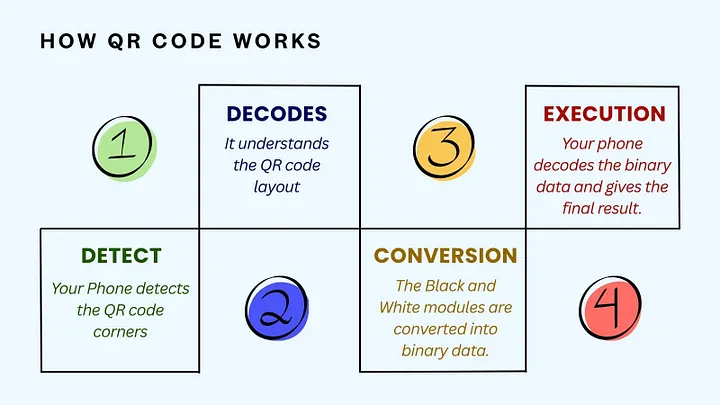
All this happens in seconds, which is why QR codes are called “quick”
What if the QR code has errors — will someone fix it from outside? No, you don’t have to fix it like you patch up every time when your girlfriend breaks up with you.
QR code have a built-in error correction, which fixes the code if it’s blurred, smudged or covered by something on top. The scanner can still reconstruct the missing data and reads the code perfectly. It makes sure nothing gets lost.
Wouldn’t it be nice if your girlfriend had a built‑in error correction too? (JK, no offense!)
In short, scanning QR code is like solving puzzles,
The corners set the frame — Patterns guide the layout — The dots become binary — Your phone decodes them — Then you get the outcome.